
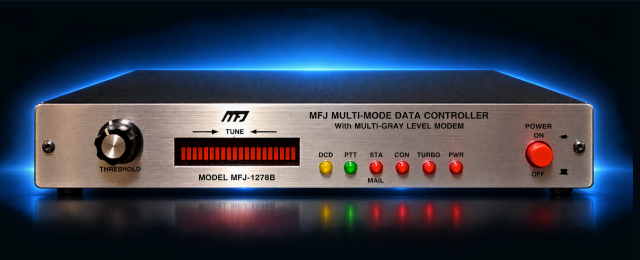
In the course of working on the TreeRatTNC, I needed a “Talk-to unit” – a second TNC that I could use to test the modulation and demodulation, as well as overall functionality. I put out a call to the people I knew who might have had any packet equipment on the shelf. I didn’t have a lot of immediate luck (some people were just out of town) – and in the mean time, I had a two week work trip. On the weekend of that trip, I stopped to visit Ed, WA9GQK. While we were discussing projects, I mentioned the need for a TNC, and he said he just happened to have an MFJ1278 in a box that he didn’t have much need for. This just so happens to be the same model that NV4B had found to be the best at decoding packets from the trial CD.
Along with the TNC, manuals, and plug, Ed had the MFJ MultiComm software (eham reviews). In reviewing the eham page, and some other web references, it certainly seemed like the general consensus is that between the embedded callsign, 3.5″ floppy disks, and 32 bit architecture, it was a bit unpopular… but a lot of people were still looking for those old installation files.
I had… an… idea. I run a Mac, and I wasn’t about to try and get it installed on there, even with CrossOver. So what to do? Well.. realistically, there’s no reason I couldn’t run it with a terminal program. But I wanted something cool. Graphical… and why not get WEFAX and SSTV working? Off to ChatGPT.
I generated a prompt – “Write a modern software suite for windows or Mac to control an MFJ1278 for all of the modes it supports including sstv”. From there, GPT gave me brief mockups to test communication, mockups of the front panel, an architecture, and a bunch of ideas. GPT is obviously not perfect, though – the original mockups included audio waterfall images.

This was all well and good – but obviously the 1278 doesn’t have the ability to provide the waterfall images. Note that I also eventually took inspiration from the MFJ logo, but I did remove “MFJ” from the title of the software and from the front panel. I did leave a photo of the 1278 on the front panel, since that’s what this was geared towards.
In writing this up, and reviewing the early work, I think that GPT was trying to incorporate rig control (I know it was), as well as some of the more advanced features of the Icom 7300 (the waterfall display, like WFView recreates) into this software. Regardless, I removed those phantom features here because I didn’t think they were really possible at this time. With regard to rig control – that is still stubbed in, but is not complete as of v 1.9.12.
I’m getting a little ahead of myself. One big challenge to using this device with my Mac is the fact that its requires a traditional RS232 serial port – which I don’t have. Off to Amazon. I ordered two USB to RS-232 devices:
- https://a.co/d/00G7qkV7 USB-C to DB-9. This can plug directly into the Mac, but will still require a modem cable / adaptor to plug in to this TNC – but it’s very useful for some other projects I have ongoing.
- https://a.co/d/06yScCcf. USB (type A) to DB-25. This would plug directly into the TNC, but still require a USB adaptor. I tried this one, and it didn’t work. Thought it was totally defective…. on a whim, I opened up the DB-25 hood, swapped pins 2 and 3 (TXD, RXD), and it worked immediately.
I’m not going to go through the entire process of development – there was a lot of trial and error, as GPT had to find the manual and learn the commands. At one point, I finally uploaded the entire manual, and push GPT to incorporate it in the software. Specifically to incorporate every command in the manual into the software. I’m not entirely sure we’re there yet – but it DID roll the manual into the help structure in the software, so the product is still open to trying things and manual control.
One area that I was concerned with (and that a VT100 terminal couldn’t do) is the picture modes – SSTV and WEFAX. I managed to find a few test image transmission recordings on YouTube. With a little work, we got that rolled in and working.
- https://www.youtube.com/watch?v=LUhy8q4H4mY One of the SSTV files (The Electronics N00B blog channel has several)
- https://www.youtube.com/watch?v=m0SuVt8g85U One of several WEFAX images – this is an actual test pattern, rather than recordings of on-air images. Better performance for testing detail and performance.
Here’s one of the early decodes for the WEFAX test image. It took a little tweaking to get everything set right, and obviously, there was some sort of interruption near the end – but I don’t think that was the MFJ glitching – more likely an interruption on my computer (I just piped audio from my computer’s headphone port to the MFJ input).

Despite it being imperfect, it was still a success. I also tried CW decoding and RTTY decoding. During Route 66 On the Air this year, I used the program to decode CW a bit, which proved it worked to me. I did a few transmit tests at one point, but I was a bit sidetracked. I’ll admit that I used FLDIGI to actually work the ONE CW station I worked for the event. Yesterday, I turned RTTY mode on the 7300, turned on the internal decoder, and tuned into a couple RTTY stations. Once I got things “locked in”, the decoding on the 7300 matched the MFJ almost exactly (might have been a bit more noise on the MFJ, but I didn’t put much into setting the threshold… this was just to prove it’s working). I figured that this would show very definitely that the SOFTWARE is working – any imperfections in the decoding would be present, even if using the OLD software.
While I was at it, I looked up the WEFAX operating schedule and frequencies, and started testing the REAL WEFAX reception capability.


As you can see – it worked pretty darned well. I wasn’t completely content – I did add a feature. WEFAX images have start and stop bars on each image. I asked GPT to search for these – once you’re decoding, it will note these, and automatically save completed images. At the bottom of the screen, it has a pane showing those saved images. Double clicking one of them will open the image in your default JPG viewer (there’s also a button to open the folder, so you can view them directly or delete them). This more or less replicates some of what I saw for one of the SSTV programs out there. As I was writing this, I also added a “tear page” button to WEFAX – in the event that the software misses an EOF / Start file sequence, this button will “tear” the page, and save everything above time cursor (it will show a horizontal cursor), remove it, and keep decoding everything below that lime.
I wanted to put this on GITHUB, but the zip file is ~20M, which it doesn’t like, and I’m not versed enough in GITHUB to upload the entire structure (folders and files).
I went out and found some AOL noises to compliment different functions in the software (you need to find these yourself, I’m not sure if they’re copyrighted)
- Launch application: “Welcome”
- Packet or PACTOR Mailbox: “You’ve Got Mail”
- SSTV file finished: “You’ve Got Pictures”
- WEFAX file finished: “You’ve Got Pictures”
- User Callsign detected in Packet: “Uh-oh” ICQ noise
- User Callsign detected in decoded text: AOL IM noise
- Normal software exit (vs. killing the operation): “Goodbye”
There’s still a lot on the roadmap…. but it’s pretty darned functional as it stands. A few of the features I want to add:
- Radio control (hamlib, at a minimum)
- modularization to support Kantronics all-mode / HF TNCs (and maybe some generic VHF TNCs, too?)
- a little cleanup on some of the diagnostics and other functions.
- ??